

You enable reCAPTCHA v3 on your WordPress site expecting it to work magically. It runs invisibly in the background and gives every submission a score from 0.0 to 1.0.
But then problems appear:
- Too many real users get blocked (low conversions).
- Or too much spam still gets through (dirty lists and wasted time).
The secret lies in threshold tuning, adjusting the score at which you accept, challenge, or block submissions. Done right, score-based reCAPTCHA v3 (and similar systems) gives you excellent spam protection with almost zero friction for real users.
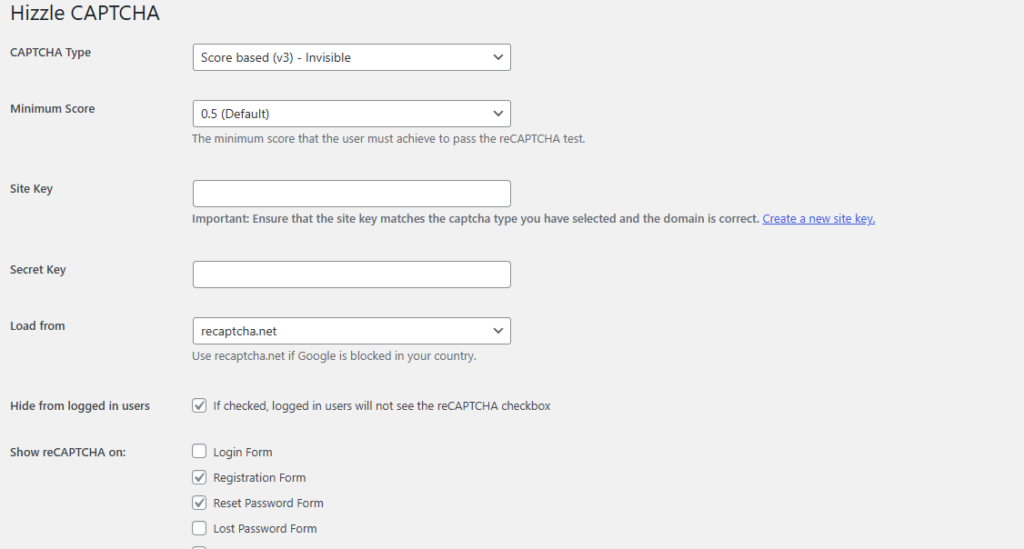
Here’s how to calibrate thresholds effectively in 2026.
Understanding reCAPTCHA v3 Scores
reCAPTCHA v3 assigns a risk score to every interaction:
- 1.0 = Very likely a real human
- 0.0 = Very likely a bot
You decide what happens at different score levels:
- Accept → Let the submission through
- Challenge → Show a visible CAPTCHA (checkbox or puzzle)
- Block → Reject the submission silently
Getting the threshold wrong is one of the most common reasons people think “v3 doesn’t work.”
Recommended Starting Thresholds
Use these as safe starting points and then fine-tune based on your site:
| Score Range | Recommended Action | When to Use This | Expected Impact |
|---|---|---|---|
| 0.7 – 1.0 | Accept | Default for most forms | High UX, good spam filtering |
| 0.5 – 0.69 | Challenge (visible CAPTCHA) | Medium-risk submissions | Good balance |
| 0.0 – 0.49 | Block | High-risk / obvious bots | Strong spam prevention |
For most WordPress sites, starting with 0.5 as the main threshold works well:
- Scores above 0.5 → Accepted automatically
- Scores below 0.5 → Escalate to visible challenge or block
Pro Tips for Better Tuning
- Test with real traffic, never rely only on your own submissions (your score will always be high).
- Combine with other signals: Honeypots, double opt-in, or IP rate limiting give you more room to keep thresholds user-friendly.
- Review scores regularly, bot behavior changes over time.
- Use Hizzle CAPTCHA’s settings page to easily switch between Google reCAPTCHA v3, invisible v2, and Cloudflare Turnstile.
Hizzle CAPTCHA makes tuning simple. In the Pro version, you get full access to score-based v3, along with easy fallback options, and you can experiment safely without breaking forms.
The Goal: Maximum Protection with Minimum Friction
Well-tuned v3 gives you the best of both worlds:
- Strong spam prevention
- High form completion rates
- Clean leads and orders
- Peace of mind that your security adapts intelligently
When your thresholds are calibrated correctly, users enjoy a smooth experience while bots are quietly filtered out.
Have you tried tuning reCAPTCHA v3 thresholds? What starting score worked best for your site? Share your experience and results in the comments!
Leave a Reply