

You want your WordPress forms to feel effortless, quick newsletter sign-ups, smooth logins, and frictionless checkouts. At the same time, you need solid protection against bots, fake submissions, and brute-force attacks.
This creates a constant tension: How much security is enough without annoying real users?
The smartest approach isn’t using the same level of verification for every form. It’s knowing when to escalate to stronger checks while keeping the default experience as smooth as possible.
Here’s how to strike the right balance between security and user experience in 2026.
The Default: Start with Zero-Friction Protection
For most everyday forms, invisible or low-friction verification works best:
- Cloudflare Turnstile or score-based reCAPTCHA v3 run quietly in the background.
- Real users rarely see anything; they submit and move on.
- Bots are still blocked using behavioral signals and risk scoring.
This gives you excellent protection with almost no impact on conversions. Most sites should start here.
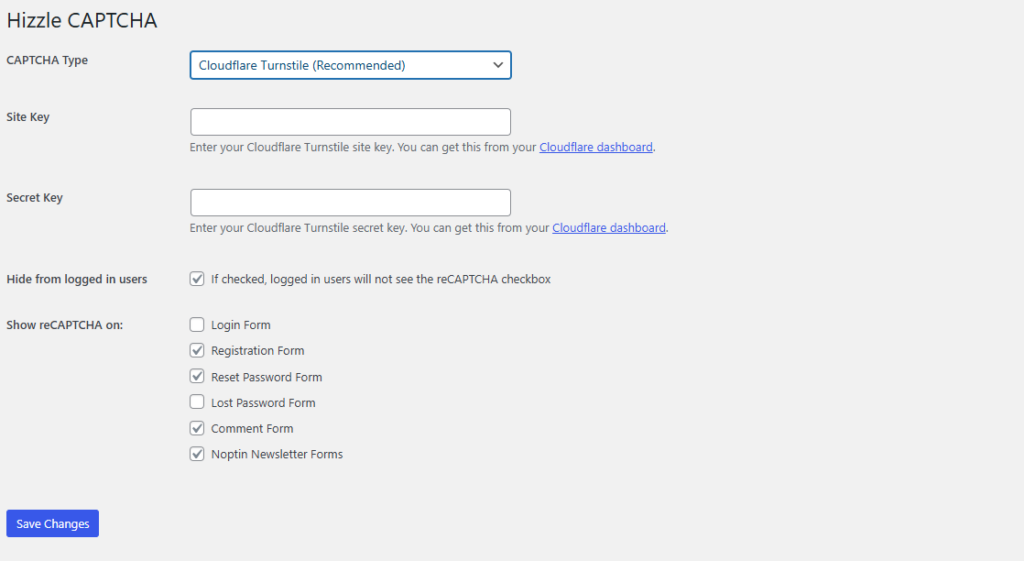
Hizzle CAPTCHA makes this easy. The free version gives you the basic reCAPTCHA v2 checkbox, while the Pro version unlocks invisible options and the highly recommended Cloudflare Turnstile, all managed from one settings page.
When to Escalate to Stronger Verification
Not every situation needs the same gentle approach. Here are the key moments when you should apply stronger (more visible) verification:
- High-Risk Actions
- Admin login attempts
- Password resets
- High-value purchases (expensive products or bulk orders)
- Account creation with sensitive data → Escalate to a visible checkbox or interactive challenge when the risk is higher.
- Repeated Failed Attempts If someone fails login multiple times or submits several suspicious form entries in a short period, escalate automatically. A fallback visible CAPTCHA tells the system “this user needs extra scrutiny.”
- Suspicious Traffic Patterns
- Traffic from known high-spam countries
- Unusual device/browser fingerprints
- Very rapid form submissions (bot-like behavior) → Stronger verification helps filter these cases without affecting normal users.
- Compliance or Industry Requirements Some sectors (finance, healthcare, government-related) may need clearer human verification for legal or audit reasons. A visible step can provide that extra layer of proof.
- After Initial Low-Score Results With score-based systems (like reCAPTCHA v3), you can set thresholds. If a submission scores low (e.g., below 0.5), automatically escalate to a visible challenge instead of blocking outright.
Smart Escalation Strategy (Recommended Approach)
The best modern setup uses progressive verification:
- Level 1 (Default): Fully invisible protection (Cloudflare Turnstile or reCAPTCHA v3) — smooth for 95–99% of real users.
- Level 2 (Escalation): Visible checkbox (“I’m not a robot”) when risk signals appear.
- Level 3 (High Risk): Stronger interactive challenge only for clearly suspicious activity.
This way, most legitimate visitors enjoy a zero-friction experience, while bots and risky attempts face appropriate resistance.
Hizzle CAPTCHA supports this flexible approach. You can configure different verification methods per form type and let the system escalate automatically when needed.
Quick Decision Guide
| Scenario | Recommended Verification Level | Why |
|---|---|---|
| Newsletter sign-up (Noptin) | Invisible (Turnstile / v3) | Maximize sign-ups, low risk |
| Contact / Quote form | Invisible | Good balance of protection and ease |
| WooCommerce checkout | Invisible with light escalation | Protect revenue without killing sales |
| Login / Registration | Invisible + escalation on failures | Prevent brute force without frustrating users |
| Admin login or password reset | Visible checkbox or stronger | Higher security needed |
The Winning Balance
Strong security doesn’t have to mean a bad user experience. By starting with invisible protection and intelligently escalating only when risk increases, you protect your site effectively while keeping real visitors happy.
The result? Cleaner data, higher conversion rates, fewer abandoned forms, and the calm confidence that comes from knowing your security adapts to the situation instead of applying a one-size-fits-all approach.
Many WordPress users find that plugins offering multiple verification methods, from a free basic checkbox to an advanced invisible Turnstile, give them the flexibility to get this balance right without technical headaches.
Have you ever escalated verification on certain forms? Did it improve security without hurting conversions? Share your approach in the comments!
Leave a Reply